Forest and Evening Fog

Forest and Evening Fog

Forest and Evening Fog. Yosemite Valley, California. October 30, 2010. © Copyright G Dan Mitchell – all rights reserved.

Evening fog drifts among forest trees of Yosemite Valley.

Yes, this was shot from Wawona Tunnel View…in the evening… while standing in a line of dozens of other photographers. Sigh. :-)

I’ve written before that I do not automatically go to Tunnel View in the evening. However, if I think something special might happen and I don’t have another subject in mind I will sometimes join the tripod line. (I also sometimes find myself there on odd evenings when almost no one else is there, but that is a different story.) On this late-October day I had been having a great time photographing the misty, cloudy, and sometimes rainy landscape – perhaps among my favorite photography conditions in the Valley. As evening approached, I was pretty certain that the wet conditions and the falling temperatures would cause fog to appear among the trees on the Valley floor close to sunset, and I have some ideas about photographs of trees in this fog that I wanted to try.

So I went to Tunnel View, put a very long lens on my camera, and queued up along the stone wall at the overlook. Because I did not plan to photograph the traditional “valley view” at all, I did not worry too much about where I was in this throng – and I ended up in a spot from which the familiar view was slightly obstructed. But that was OK since I was going to be pointing my lens down. This fog is not an unusual phenomenon, but it is different every time it occurs. Sometimes it builds up high enough to hover around the upper reaches of El Capitan. Sometimes there will just be thin wisps up the center of the Valley. Sometimes it is almost stationary and sometimes it moves quickly. On this evening it started out slowly and somewhat thin, but soon a breeze began blowing the moist air up from the west and a long ribbon of fog developed along the north side of the Valley floor, and I focused my attention along the borders near the edges of the fog.

This photograph is not in the public domain and may not be used on websites, blogs, or in other media without advance permission from G Dan Mitchell.

G Dan Mitchell Photography | Twitter | Friendfeed | Facebook | Facebook Fan Page | Email

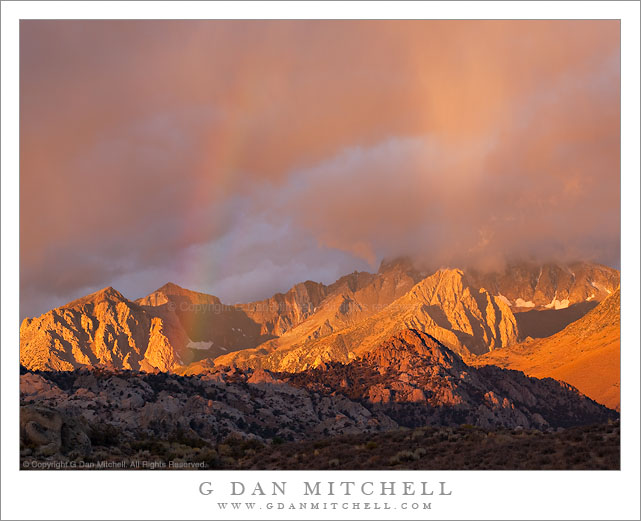
Sunrise Rainbow and Virga Above the Buttermilks

Sunrise Rainbow and Virga Above the Buttermilks

Sunrise Rainbow and Virga Above the Buttermilks. Sierra Nevada, California. October 3, 2010. © Copyright G Dan Mitchell – all rights reserved.

Brief sunrise light produces a rainbow and virga over the Buttermilks in the eastern Sierra Nevada above Bishop, California.

I have a story to tell about this photograph and how it came about. I’ve been in the Buttermilks — the rounded hills between Bishop, California and the actual Sierra Nevada — on a number of previous occasions. I’ve photographed there in the early morning when the first light hits these hills and the peaks of the Sierra, and I have some potential images filed away in my mind, waiting for a time when the light is right. I also know the Sierra well enough – though certainly not completely nor perfectly! – that I can pick up on developing conditions that might not apparent to someone less familiar with the range.

On this early October morning I was camped up in the Bishop Creek drainage. The forecast was for rain and wind and, sure enough, during the night the wind picked up and it began to rain. I woke before dawn and at the first light it was apparent that it would be overcast. This is not necessarily a bad thing for photographing fall color, but it can mean that subjects that would otherwise work at dawn might need to wait. I was thinking about how to modify my aspen photography plans when I noticed a bit of incipient color in the still-dim clouds, and it occurred to me that a special set of conditions might occur. Although I couldn’t see to the east from this campground, I know that sometimes clouds above the Sierra end a ways to the east over or beyond the White Mountains, and when this happens there is a narrow band of clear sky right above the horizon — and if everything works out just right a strip of dawn light shines through this gap, first hitting the clouds and then working its way down from the peaks to the lower foothills before quickly disappearing and leaving very bland light.

No sure thing at all, but I decided to dash down the road (past the steady stream of aspen photographers streaming up the road!) and see if I could get to the Buttermilks in time. I left the main road and headed up a side road that I know, somewhat resenting a (very reasonable!) 25mph speed limit near some roadside residences as I began to see the clouds above the crest starting to light up. As I hit the last section of gravel road the sky began to glow and I sped up, heading for a specific spot where I had photographed this scene before. With seconds I saw the light pick out a band of virga (rain that does not reach the ground) and a rainbow began to form in front of the eastern escarpment as I arrived at the hilltop where I planned to shoot. I quickly set up my tripod and mounted the 70-200mm lens (which I already knew would be the right one for this shot) and literally ran up a nearby knoll which I knew would put the foreground hill in a decent place in the composition. I was ready just as the soft light hit the foreground and I made this photograph. Within a minute the rainbow as gone!

Sometimes you just get lucky…

This photograph is not in the public domain and may not be used on websites, blogs, or in other media without advance permission from G Dan Mitchell.

G Dan Mitchell Photography | Twitter | Friendfeed | Facebook | Facebook Fan Page | Email

An Itinerant Photographer and His iPad: A Second Report

Some time ago I posted “An Itinerant Photographer and His iPad: A First Report” – and this is a follow-up to that post, written after a few more months of experience with the iPad. It is also an expanded version of something that I posted in a photography forum in response to a question about using the iPad as an image backup device.

One question that seems to come up a lot is whether it is possible/viable to use the iPad as a backup device for making copies of your files in the field. There at least two reasons that you might want to copy your files from your camera’s memory to an external storage. First, you may want to create duplicate backup copies of the image files on your camera memory cards for safety reasons – it is risky to have only single copies of them. Second, some might choose to do this so that they can economize by using a single memory card, transferring files from the card when it is full, erasing the card, and starting over again. I’m not convinced that this makes a lot of sense given the relatively low cost of memory cards today and the risks of having only a single copy of your files.

You can transfer raw files directly from your camera to the iPad using a USB cable and the “camera connection kit” adapter. Here are ome observations based on my experience doing this:

  • It works – you can move your raw files to the iPad and view them there.
  • The process is very slow. Thumbnail previews appear quite quickly, but downloading is a very long process during which I usually find something else to do.
  • You need to think through the memory issues carefully. Your raw files are quite large and the maximum memory in an iPad is currently 64GB. I have the maximum in mine which leaves me about 32GB for photographs. (I have a lot of music and video files on my iPad – perhaps more than the typical user.) There will be very little space for photographs if you get the 16GB model and the 32GB might be tight depending upon what else you store on it.
  • You can view the raw files directly on the iPad. They are not optimized – and raw files need some sharpening and so forth to look their best – but they are fine for previewing images and sharing with others who might want to quickly see what you came up with. Don’t underestimate the value of being able to share files this way. I notice that sharing the images with others on the iPad is often a more natural and pleasant experience than sharing them on a laptop – viewers will frequently hold the iPad and pass it to one another in ways that are rarely seen with laptops.
  • The raw files cannot display at full native resolution – there is some upper boundary currently built into the iPad – though they do  display at a resolution that is considerably larger than that of the iPad screen.
  • I may be missing something that would make the task simpler, but I don’t find it very easy to delete the files from the iPad once they are transferred to my computer.

A bottom line is that you can use an iPad for backing up files in the field, but you need to be aware of several issues before you decide to depend on this. The issues include the very slow file transfer speed and the importance of making sure that the unused memory on your iPad is sufficient for the files you will transfer. With a 64GB iPad, the vast majority of users will have more than 32GB available.

(If the speed and storage space limitations of the iPad are a problem for you, there are other options for backing up in the field. There are specialized back drive products that are designed for making backups of your camera memory cards, or you could use a regular laptop. The tradeoff its greater storage capacity and access to more photo editing applications include shorter battery life and greater size/weight.

What about image editing on the iPad? Several programs are available the provide varying levels of image editing capability.  I use Photogene. It is competent and well-worth the very tiny cost. It provides basic editing features that can let you create decent (but not stellar) jpgs for upload. It does a curve, cropping, black and white conversion, color adjustments, simple sharpening and so forth – but it most definitely is not Photoshop or Light Room. That said, I’ve used it for doing quick edits and web posts from the field. For what it is and for the very low cost, I recommend it. (iPad apps appear so rapidly that it is quite possible that other options will be available by the time you read this.)

Can an iPad replace your laptop? The iPad is only sort of a laptop replacement – I like to simply say that “an iPad is not a laptop,” though it can perform some tasks that you might otherwise use a laptop for. It is great for web browsing and OK for email, though extensive typing on the virtual keyboard is awkward and error-prone. I am fine with it for short emails and short web posts and reading the updating social media sites. You can do better with an external keyboard, but this starts to defeat the small size/weight and convenience of the iPad and makes a laptop look like less of a burden.

Battery life is excellent. Apple is not lying when they claim 10 hours per charge.

The tiny size and small weight make a significant difference. Even my small laptop seems downright large after carrying the iPad instead. It is small enough to easily slip into a side pocket of my camera bag when traveling. I left the laptop at home and carried only an iPad on a weeklong trip to New York City. I was very grateful for the size and weight savings and only mildly inconvenienced by missing some of the power of the laptop I would usually take. What with tripods, lenses, bodies, flash equipment and other gear, I welcome the smaller size/weight of the iPad when a regular laptop is not really needed.

One other reason to have an iPad is that publishing is likely to move increasingly to forms that can be distributed on devices such as the iPad. Photographers would do well to experience and understand this first hand, especially if they intend to distribute their photographs electronically and/or write about photography.

VERDICT:

It will make sense for some photographers and some circumstances, but not for others. There is no universal “right” answer to the question of whether the iPad is a useful tool for photographers – the real question is whether its features will or will not be useful to you. For my part, when I don’t have to do more than minimal editing in the field and I want to share electronic versions of photographs and travel light… I prefer to take the iPad rather than my laptop.

What do you think? Do you use an iPad for photography-related purposes? Are you wondering if it will work for you? Leave a comment via the link found below.

Yosemite Fall and Lost Arrow, Fog and Mist

Yosemite Fall and Lost Arrow, Fog and Mist

Yosemite Fall and Lost Arrow, Fog and Mist. Yosemite National Park, California. October 30, 2010. © Copyright G Dan Mitchell – all rights reserved.

Yosemite Fall and Lost Arrow emerge from drifting storm clouds, Yosemite Valley.

When I traveled to Yosemite Valley this past weekend I knew that rain was coming on Saturday – and I was happy about this since I love photographing the Valley in rainy and misty weather. I made a plan to photograph, among other things, what I expected would be cloud and mist floating among the cliffs, trees, and waterfalls of the Valley – and I wasn’t disappointed!

This is a photograph of a Yosemite icon, Upper Yosemite Fall. As clouds drifted across the face near the fall and into the valleys above, from time to time there would be a bit of clearing. Occasionally a clear view of the waterfall would even appear for a moment. At this moment in time, the spire of “Lost Arrow” also appeared along the side of the cliff at the upper right.

This photograph is not in the public domain and may not be used on websites, blogs, or in other media without advance permission from G Dan Mitchell.

G Dan Mitchell Photography | Twitter | Friendfeed | Facebook | Facebook Fan Page | Email