
Tag Archives: display

An Itinerant Photographer and His iPad: A Second Report

Some time ago I posted “An Itinerant Photographer and His iPad: A First Report” – and this is a follow-up to that post, written after a few more months of experience with the iPad. It is also an expanded version of something that I posted in a photography forum in response to a question about using the iPad as an image backup device.

One question that seems to come up a lot is whether it is possible/viable to use the iPad as a backup device for making copies of your files in the field. There at least two reasons that you might want to copy your files from your camera’s memory to an external storage. First, you may want to create duplicate backup copies of the image files on your camera memory cards for safety reasons – it is risky to have only single copies of them. Second, some might choose to do this so that they can economize by using a single memory card, transferring files from the card when it is full, erasing the card, and starting over again. I’m not convinced that this makes a lot of sense given the relatively low cost of memory cards today and the risks of having only a single copy of your files.

You can transfer raw files directly from your camera to the iPad using a USB cable and the “camera connection kit” adapter. Here are ome observations based on my experience doing this:

  • It works – you can move your raw files to the iPad and view them there.
  • The process is very slow. Thumbnail previews appear quite quickly, but downloading is a very long process during which I usually find something else to do.
  • You need to think through the memory issues carefully. Your raw files are quite large and the maximum memory in an iPad is currently 64GB. I have the maximum in mine which leaves me about 32GB for photographs. (I have a lot of music and video files on my iPad – perhaps more than the typical user.) There will be very little space for photographs if you get the 16GB model and the 32GB might be tight depending upon what else you store on it.
  • You can view the raw files directly on the iPad. They are not optimized – and raw files need some sharpening and so forth to look their best – but they are fine for previewing images and sharing with others who might want to quickly see what you came up with. Don’t underestimate the value of being able to share files this way. I notice that sharing the images with others on the iPad is often a more natural and pleasant experience than sharing them on a laptop – viewers will frequently hold the iPad and pass it to one another in ways that are rarely seen with laptops.
  • The raw files cannot display at full native resolution – there is some upper boundary currently built into the iPad – though they do  display at a resolution that is considerably larger than that of the iPad screen.
  • I may be missing something that would make the task simpler, but I don’t find it very easy to delete the files from the iPad once they are transferred to my computer.

A bottom line is that you can use an iPad for backing up files in the field, but you need to be aware of several issues before you decide to depend on this. The issues include the very slow file transfer speed and the importance of making sure that the unused memory on your iPad is sufficient for the files you will transfer. With a 64GB iPad, the vast majority of users will have more than 32GB available.

(If the speed and storage space limitations of the iPad are a problem for you, there are other options for backing up in the field. There are specialized back drive products that are designed for making backups of your camera memory cards, or you could use a regular laptop. The tradeoff its greater storage capacity and access to more photo editing applications include shorter battery life and greater size/weight.

What about image editing on the iPad? Several programs are available the provide varying levels of image editing capability.  I use Photogene. It is competent and well-worth the very tiny cost. It provides basic editing features that can let you create decent (but not stellar) jpgs for upload. It does a curve, cropping, black and white conversion, color adjustments, simple sharpening and so forth – but it most definitely is not Photoshop or Light Room. That said, I’ve used it for doing quick edits and web posts from the field. For what it is and for the very low cost, I recommend it. (iPad apps appear so rapidly that it is quite possible that other options will be available by the time you read this.)

Can an iPad replace your laptop? The iPad is only sort of a laptop replacement – I like to simply say that “an iPad is not a laptop,” though it can perform some tasks that you might otherwise use a laptop for. It is great for web browsing and OK for email, though extensive typing on the virtual keyboard is awkward and error-prone. I am fine with it for short emails and short web posts and reading the updating social media sites. You can do better with an external keyboard, but this starts to defeat the small size/weight and convenience of the iPad and makes a laptop look like less of a burden.

Battery life is excellent. Apple is not lying when they claim 10 hours per charge.

The tiny size and small weight make a significant difference. Even my small laptop seems downright large after carrying the iPad instead. It is small enough to easily slip into a side pocket of my camera bag when traveling. I left the laptop at home and carried only an iPad on a weeklong trip to New York City. I was very grateful for the size and weight savings and only mildly inconvenienced by missing some of the power of the laptop I would usually take. What with tripods, lenses, bodies, flash equipment and other gear, I welcome the smaller size/weight of the iPad when a regular laptop is not really needed.

One other reason to have an iPad is that publishing is likely to move increasingly to forms that can be distributed on devices such as the iPad. Photographers would do well to experience and understand this first hand, especially if they intend to distribute their photographs electronically and/or write about photography.

VERDICT:

It will make sense for some photographers and some circumstances, but not for others. There is no universal “right” answer to the question of whether the iPad is a useful tool for photographers – the real question is whether its features will or will not be useful to you. For my part, when I don’t have to do more than minimal editing in the field and I want to share electronic versions of photographs and travel light… I prefer to take the iPad rather than my laptop.

What do you think? Do you use an iPad for photography-related purposes? Are you wondering if it will work for you? Leave a comment via the link found below.
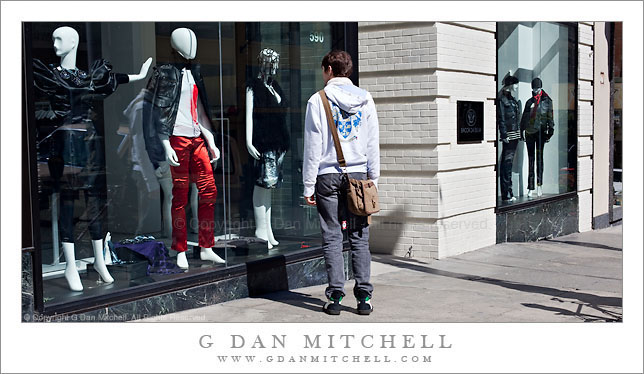
Person Looking at Window Display

Person Looking at Window Display

Person Looking at Window Display. San Francisco, California. March 6, 2010. © Copyright G Dan Mitchell – all rights reserved.

Photograph of a person looking at mannequins in a store display window along a San Francisco street.

I posted a black and white version of this photograph a week or so ago, but I wasn’t quite able to give up the crazy colors in the display window of this store… so here is the color version.

This photograph is not in the public domain and may not be used on websites, blogs, or in other media without advance permission from G Dan Mitchell.

G Dan Mitchell Photography | Twitter | Friendfeed | Facebook | Facebook Fan Page | Email

Technical Data:
Canon EOS 5D Mark II
Canon EF 50mm f/1.4 USM
ISO 200, f/11, 1/320 second

keywords: person, man, sidewalk, stand, walk, street, urban, city, downtown, mannequin, figure, show, window, display, red, satin, purple, white, sweatshirt, look, gaze, bacca da silva, story, bright, sun, light, brick, wall, san francisco, california, usa, north america, sign, shadow, stock

Person Looking at Window Display

Person Looking at Window Display

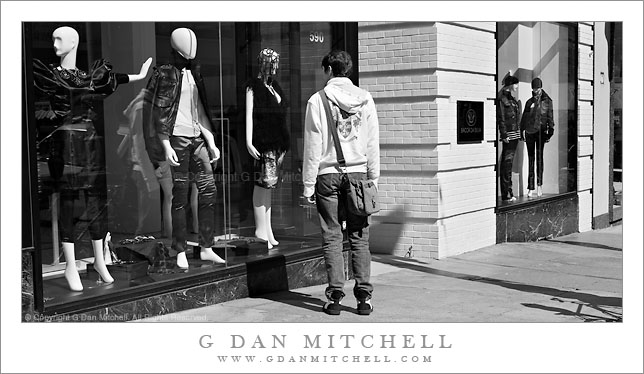
Person Looking at Window Display. San Francisco, California. March 6, 2010. © Copyright G Dan Mitchell – all rights reserved.

Black and white photograph of a person looking at mannequins in a store display window along a San Francisco street.

I saw this starkly-lit scene while walking not far from Union Square in downtown San Francisco in early March. The difference between the body position and posture of the person standing in the foreground and the highly stylized and quite unreal figures in the display case caught my attention. (I’m still going back and forth between this black and white version and the color rendition which shows the wild colors of the mannequins – the middle one wears shiny red pants and seems to have a blood stain on “his” shirt!) I also liked the somewhat skewed angles and perspective from the wall of the building and the descending sidewalk to the right, broken up a bit by shadows from a bicycle and a pole.

For those who might wonder, there is still a bit more urban and street photography in the queue before my more familiar landscape photography returns.

This photograph is not in the public domain and may not be used on websites, blogs, or in other media without advance permission from G Dan Mitchell.

G Dan Mitchell Photography | Twitter | Friendfeed | Facebook | Facebook Fan Page | Email

Technical Data:
Canon EOS 5D Mark II
Canon EF 50mm f/1.4 USM
ISO 200, f/11, 1/320 second

keywords: san francisco, california, usa, north america, city, urban, street, sidewalk, person, man, bag, stand, look, store, window, display, mannequin, brick, wall, shadow, downtown, modern, clothes, sweatshirt, jeans, window, union, square, stock

Why I like DSLR Live View Shooting

(Notes: Article slightly updated in February 2015. Original article title was “Canon EOS 5D Mark II: Why I like ‘live view’.” These days the Canon 5DII is no longer my primary camera, but the points remain much the same.)

It took me a while, but I eventually came to rely on live view a lot in my photography.

Back when I acquired a Canon EOS 5D Mark II I assumed that the main improvement over my previous camera would come from the 21 megapixel sensor — the previous camera had only 12 MP. Other features of the updated version of the Canon 5D series seemed like they would either be minor improvements or perhaps not be of any use to me at all. I lumped the “live view” feature of the camera into the latter category. I understood that it would permit me to view the scene “live” on the rear screen, but I failed to see any big advantage over looking through the viewfinder, and much of what I had heard suggested that there would be serious downsides to the feature.

Consequently, it wasn’t until after I had the camera for some time that I actually thought to try out live view, which locks up the mirror and shows a video version of the live image on the rear display. At first the feature seemed very counterintuitive, since I was completely used to looking at the traditional kind of “live” view – the one seen through the viewfinder. On top of this, with live view enabled the normal autofocus system is turned off – or, more correctly, works in a very different way. However, once I did start to use live view I realized that it is one of the most significant and useful features of the Canon 5D Mark II for certain types of photography. How is it useful? Here is a list:

  1. Live histogram – You can display a live histogram on the rear screen in live view. This histogram display updates instantaneously as the scene changes or as you make exposure adjustments. Rather than making an exposure, checking the histogram, making adjustments, and then shooting again – you can simply get it right the first time.
  2. Manual focus – In many cases live view provides the very best method for achieving accurate manual focus. While you can manually focus on the ground glass of the normal viewfinder, really critical manual focus is very difficult using that approach. However, with live view you can zoom in to 5X or 10X or higher magnification and focus precisely on any point in the frame by moving the portion of the image shown in the magnified view. This is like having a 10x loupe built into the camera. There are more advantages related to manual focusing, but I’ll break them out separately below.
  3. Accurate Depth of Field – Determining what will and will not be sharp enough at a given aperture has always involved a bit of guesswork on a DSLR. You can press the Depth of Field (DOF) Preview button and try to check this visually, but this is even more difficult than trying to achieve accurate manual focus via the viewfinder. When you press the DOF Preview button the optical viewfinder becomes dark, making it difficult or impossible to accurately assess DOF. However, live view automatically adjusts the display brightness when you press the DOF preview button – so you can see the image as well at f/16 as you can at f/1.4. Not only that, but you can again use the 5X or 10X or higher magnification on any part of the scene to check focus of any area of the composition with great accuracy.
  4. Night photography – It was while doing night photography that I first gave live view a serious try. I was shooting some industrial subjects under full moon and artificial light and trying to focus on the side of a dimly lit building without much luck. AF could not acquire focus, and in the darkness I couldn’t see enough detail to focus manually through the viewfinder. However, with live view — keeping in mind that the camera adjusts the image brightness on the screen — my very dark subject was light enough that I could manage to focus manually and get a sharp image.
  5. Neutral density filters – I sometimes use a 9-stop neutral density (ND) filter in order to make rather long daytime exposures. The 9-stop ND is so dark that you cannot really even see your scene through it and composing and focusing are impossible. My previous method of operation was to compose the scene and focus first, switch off the AF feature, attach the ND, and then shoot “blind.” However, if I needed to change the composition or adjust focus I would need to remove the ND filter again and repeat the laborious process. I quickly discovered that the live view can display a useful image even with this filter attached, permitting changes in composition, manual focus, and even depth of field checks while the filter remains in place.
  6. Optional display grid – Several different electronic grids may optionally be superimposed on the live view display. I often switch on the  3 x 3 (three horizontal and three vertical lines) grid to check that the horizon is level or that vertical lines are actually vertical.
  7. Awkward camera positions – As long as you can still see the LCD, you can place your camera in positions that would not work if you had to compose through the viewfinder and would otherwise have to “shoot blind” or miss the shot. I’ve found it useful for some wildflower shots where the camera had to be down low among the plants. In addition, I can shoot with the camera on the tripod raised well above eye height with live view – this has allowed me to, for example, shoot over the tops of tall fences or simply get a higher perspective.
  8. Tilt/Shift lenses – Although I’m not a tilt/shift lens user, several photographers (see below for the link to the first of them) pointed out that live view greatly improves the usability of T/S lenses and makes it easier to achieve critical focus.
  9. Shooting in windy conditions – Here’s a new and unexpected use of live view that I discovered in January 2011 when shooting with a 400mm lens in windy conditions. In such conditions I’ll often wait until  the wind have briefly calms enough to get a sharp image, but it can still be a bit of a guess. However, if I activate live view and use the 10x magnification I can directly see the effect of the wind on the image and then simply hit the remote release button when I see the vibration stop in the display.
  10. Elimination of mirror and shutter vibration – Because today we push small original images from cropped sensor or full frame sensor DSLRs to greater and greater print sizes, all factors that affect potential image sharpness become more critical. When it comes to minimizing mechanical vibration within the camera, live view is the current best solution. Because the mirror is already raised so that the image from the sensor is visible while focusing and composing, “mirror slap” vibration is completely eliminated. In addition, by selected an electronic first curtain option, the shot can be initiated without motion from the shutter curtain. According to tests I’ve seen and judging by my own experiments, when you are doing critical work from the tripod this can materially help when it comes to eliminating blur from camera motion.
  11. Camera Sound – In some situations the sound of a DSLR is objectionably loud, both from the slap of the mirror rising and falling and from the physical motion of the shutter curtain. On at least some cameras with live view, there is a first and second electronic curtain setting – called mode 2 on my Canon DSLR – that starts and ends the exposure electronically rather than flapping the shutter curtain across the sensor. It also leaves the camera in live view mode at the end of the exposure, rather than flipping the mirror back down. This significantly reduced – though doesn’t eliminate – the volume of sound from the camera, so it can be useful in certain situations where the shutter/mirror sound might otherwise be too loud.

This list could be even longer, but I’ll stop here for now. Are there any downsides to using live view? In some situations there are, so live view is not called for in every photograph.

  1. Battery life – The use of live view significantly reduces the number of frames you can expose before your battery runs out of power. I have made 400-500+ photographs on one battery with the 5D II without live view and not run the battery down to the point that I would think about switching. However, with heavy live view use on a few occasions I got only a few more than 200 shots. I limit my use of live view in situations where battery life is an issue, such as when I go on long backpacking trips. (Hint: Rather than leaving the camera in this battery-draining mode, sometimes it pays to focus and compose in live view, then switch back to the “normal” mode with mirror lock-up enabled to wait for the right moment to make the exposure.)
  2. Active subjects – While live view is great for relatively static subjects (such as architecture and landscapes, for example) it is far less suited to shooting active subjects. For those I’ll stick to using the through-the-lens viewfinder.
  3. Portraits – While you certainly could shoot portraits in live view, I think that it is sometimes better to either peer through the pentaprism viewfinder at the almost-real view seen there or, better yet in some cases, step back from the viewfinder/camera and just look right at your subjects. (Update: Someone with far more portrait experience than I have recently made a very good a point about getting away from the viewfinder and communicating directly with your subject – though you could do that independent of Live View.)
  4. Autofocus – Autofocus is possible in live view, but either of the options for AF are a bit clunky. (They are improving as of this most recent update.) I virtually never use live view with AF, but almost always use it with manual focus.

When I first wrote this article, soon after beginning to use live view, I wrote, “In the end, although I shoot more often without live view than with it, for certain types of photography I now find it indispensable , including much urban and natural landscape work, night photography, and when working with neutral density filters.” Much of that sentence still stands, but the truth is that in my photography I now use live view most of the time.

UPDATES:

Todd Klassy points out that live view is very powerful for those who shoot with tilt/shift lenses.

Regarding my point about portraits, someone with far more portrait experience than I have recently made a very good a point about getting away from the viewfinder and communicating directly with your subject – though you could do that independent of Live View.

A “thank you” to 1001 Noisy Cameras 5DMKII blog for the link.


G Dan Mitchell is a California photographer and visual opportunist. His book, “California’s Fall Color: A Photographer’s Guide to Autumn in the Sierra” (Heyday Books) is available directly from him.

G Dan Mitchell: Blog | Bluesky | Mastodon | Substack Notes | Flickr | Email


All media © Copyright G Dan Mitchell and others as indicated. Any use requires advance permission from G Dan Mitchell.Mitchell.